
Before/After Image Slider with Change Notes That Follow the Divider (Standalone HTML, CSS and JavaScript)
A before/after image comparison slider for builders' and renovation websites. Up to four change notes such as "Countertop: wood-grain laminate → engineered marble" sit on the photo, and each note's label shows only while the divider is to the right of its point. Tap the photo to drop a note at that spot; type its text in the side panel and the label on the photo and the list below update immediately, with the divider moving so the label is visible. Clicking a list row moves the divider 6% to the right of that point, so the selected label is always shown. The divider is a transparent input type="range" laid over the photo: arrow keys, Home and End move it, and aria-valuetext reads "Before 40%". The thumb is a 46 px white circle with an amber ring, and taps anywhere else pass through to the photo. The photo frame reserves a 16:10 aspect-ratio to avoid layout shift, and touch-action: pan-y keeps vertical scrolling working. Below 640 px only numbered dots are drawn on the photo and the text moves to the list. "Try your own photos" shows a before and an after image in the browser only via URL.createObjectURL, with no upload or storage. "Copy code" exports a dependency-free standalone HTML file with the CSS, JavaScript and the change notes as JSON, with comments marking where to swap the image paths. With the sample photos, the divider position and selected point are kept in the share link as ?pos=40&pt=2; your own photos are never included. The sample kitchen is fictional: the same camera angle, with only the door colour, countertop, lighting and handles changed.
Preview
BLK-113
ビフォーアフタースライダー|
工務店・リフォームサイト向けのビフォーアフタースライダーです。施工前と施工後の画像比較に「天板:木目調→人造大理石」のような変更点を重ね、境目がその場所を越えたときだけ説明の札を出します。作った比較は、HTML・CSS・JavaScriptだけで動く1枚のファイルとして書き出せます。
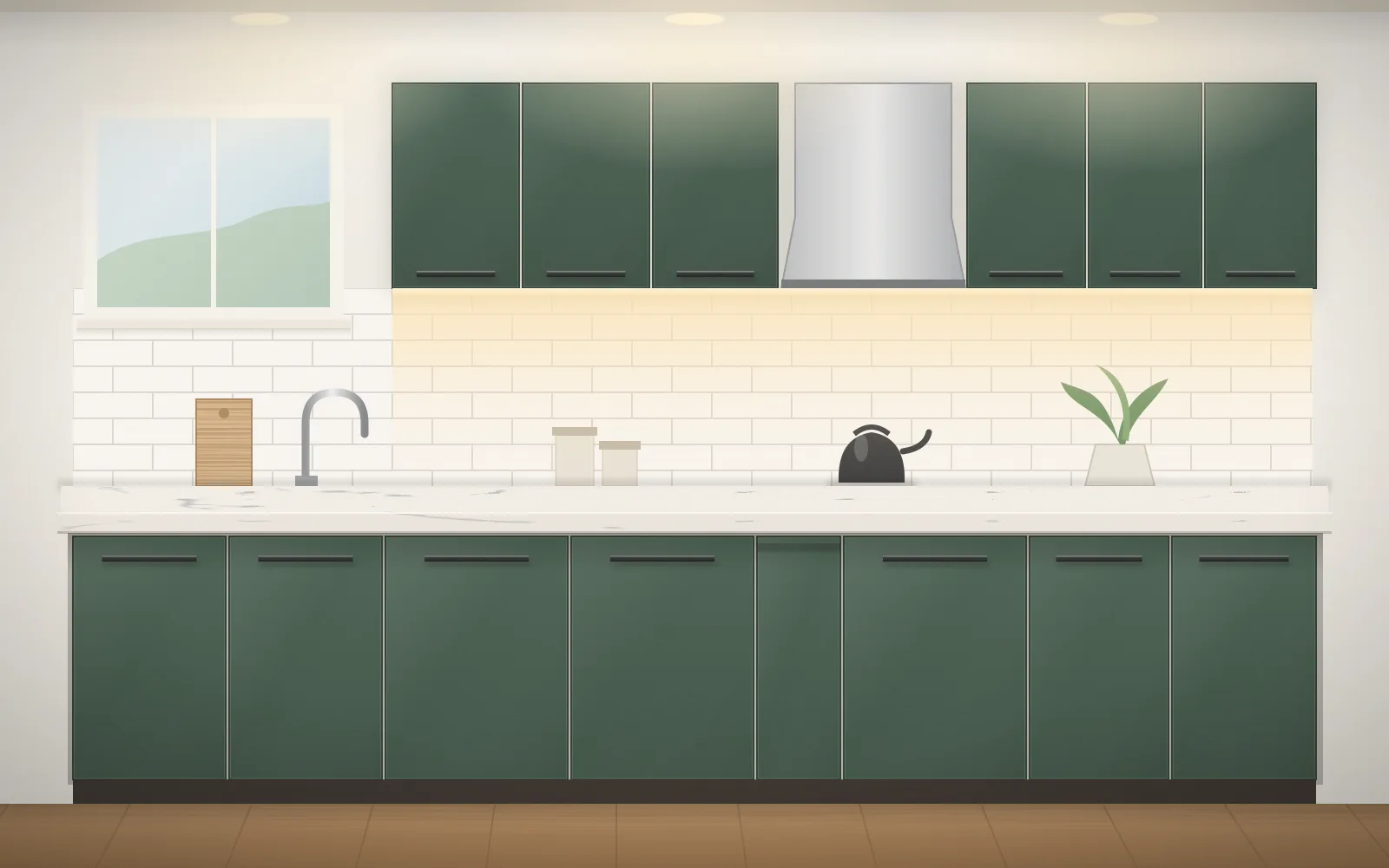
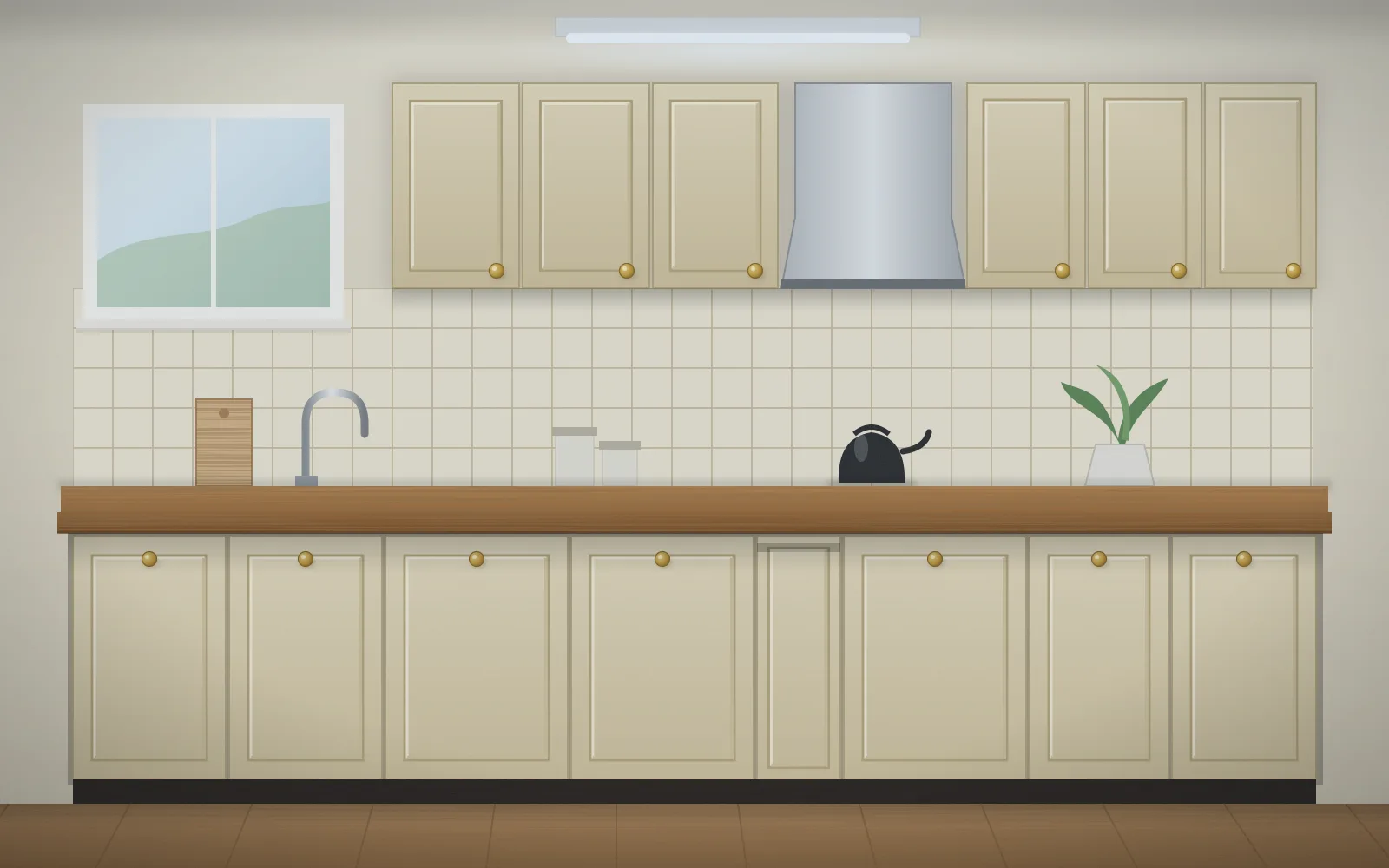
架空の制作例です
左が施工前・右が施工後|境目 56%
写真をタップすると、その位置に変更点が置かれます(最大4点)。
変更点の文言 3 / 4
「部位:変更前→変更後」の形で入れると、札とリストに部位が太字で出ます。
同じ画角で撮った2枚を選びます。写真はこのブラウザの中だけで表示し、送信・保存はしません。共有リンクにも含まれません。16:10の枠に中央で切り抜いて表示します。
HTMLを書き出す
今の変更点と境目の位置を入れた、依存なしの単体HTMLです。写真のパスを差し替える場所はコメントで示しています。
共有リンクには境目(56%)と選んだ点(2)だけが入ります。
施工事例のページを作るとき
施工前後の写真は、同じ位置・同じ高さ・同じ焦点距離で撮ると境目で見比べやすくなります。変更点は3〜4点に絞ると、札が写真を覆いません。
工務店・リフォーム会社のサイト制作を相談するRead the full description
A before/after image comparison slider for builders' and renovation websites. Up to four change notes such as "Countertop: wood-grain laminate → engineered marble" sit on the photo, and each note's label shows only while the divider is to the right of its point. Tap the photo to drop a note at that spot; type its text in the side panel and the label on the photo and the list below update immediately, with the divider moving so the label is visible. Clicking a list row moves the divider 6% to the right of that point, so the selected label is always shown. The divider is a transparent input type="range" laid over the photo: arrow keys, Home and End move it, and aria-valuetext reads "Before 40%". The thumb is a 46 px white circle with an amber ring, and taps anywhere else pass through to the photo. The photo frame reserves a 16:10 aspect-ratio to avoid layout shift, and touch-action: pan-y keeps vertical scrolling working. Below 640 px only numbered dots are drawn on the photo and the text moves to the list. "Try your own photos" shows a before and an after image in the browser only via URL.createObjectURL, with no upload or storage. "Copy code" exports a dependency-free standalone HTML file with the CSS, JavaScript and the change notes as JSON, with comments marking where to swap the image paths. With the sample photos, the divider position and selected point are kept in the share link as ?pos=40&pt=2; your own photos are never included. The sample kitchen is fictional: the same camera angle, with only the door colour, countertop, lighting and handles changed.
- Added:
- 2026-11-10
- Updated:
- 2026-11-12
- Dependencies:
- None
- tags
- #before-after #image-compare #slider #input-range #clip-path #annotation #renovation #construction #standalone-html #code-export #object-url #share-url #a11y #keyboard #no-dependency
"use client";
import {
useCallback,
useEffect,
useId,
useRef,
useState,
type ChangeEvent,
type MouseEvent as ReactMouseEvent,
} from "react";
/**
* ビフォーアフタースライダー(BLK-113)|変更点の説明が境目と連動する画像比較
*
* 差別化: 既存の比較スライダー(before-after-compare)は2枚の誌面を境目で見比べるだけの表示部品で、
* 画像ホットスポット(image-hotspot-tour)は1枚の写真の説明。本ブロックは写真の上に変更点を打ち、
* 境目がその点を越えたときだけ札が出る「説明付きの施工事例」を作り、依存なしの単体HTMLとして書き出す制作ツール。
* 英字の小見出し・見出しの「。」止め・末尾の矢印リンク・角丸のカード・スクロール出現は使わない。
*
* 汎用技法メモ:
* 1. **境目は透明な <input type="range"> を写真に重ねて作る**。矢印・Home・End・PageUp/Down と読み上げは
* ブラウザが持っているので、自前の role="slider" より壊れにくい。input は pointer-events: none にし、
* つまみ(::-webkit-slider-thumb / ::-moz-range-thumb)だけ pointer-events: auto に戻すと、
* つまみ以外の写真のタップは下の要素へ届く(=タップで変更点を置ける)。
* 2. **つまみの中心と境目の線を一致させる**。range のつまみは「左端+つまみ半径」から「右端−半径」までしか動かないので、
* input を左右に半径ぶんはみ出させる(left: -22px; width: calc(100% + 44px))。すると値 v% のつまみの中心が
* 写真の幅の v% に来て、clip-path の切り口と1pxもずれない。
* 3. **上に重ねる施工前は clip-path: inset(0 calc(100% - pos) 0 0) で削る**。幅を変えないので画像が再配置されない。
* 4. **札は「境目が点より右」の間だけ出す**。施工前の側にある変更点だけに「何が何に変わるか」を出すので、
* 境目を左へ送ると札が1枚ずつ消えて施工後が見える。リストの行を押すと境目を点の6%右へ送るので、選んだ札は必ず出る。
* 5. 写真は aspect-ratio で枠を先に確保して CLS を防ぎ、touch-action: pan-y で写真の上でも縦スクロールを止めない。
* 6. 自分の写真は URL.createObjectURL でこのページの中だけで表示し、差し替え・離脱で revokeObjectURL する。送信も保存もしない。
*/
type Point = { id: number; x: number; y: number; text: string };
const EXAMPLE = {
before: "/designs/before-after-slider-before.webp",
after: "/designs/before-after-slider-after.webp",
w: 1600,
h: 1000,
altBefore:
"施工前の架空のキッチン。クリーム色の框扉に真鍮のつまみ、木目調の天板、天井に蛍光灯が1本",
altAfter:
"施工後の同じキッチン。深緑のフラット扉に黒いバーの取っ手、白い人造大理石の天板、吊戸棚の下にLEDの光",
};
const SITE = "https://designs.first-ch.com";
const INITIAL: Point[] = [
{ id: 1, x: 0.17, y: 0.77, text: "扉色:クリーム色の框扉→深緑のフラット扉" },
{ id: 2, x: 0.47, y: 0.585, text: "天板:木目調→人造大理石" },
{ id: 3, x: 0.71, y: 0.38, text: "照明:天井の蛍光灯→吊戸棚下のLEDライン" },
];
const INITIAL_POS = 56;
const MAX_POINTS = 4;
const HANDLE_HINT = "取っ手:真鍮のつまみ→黒いバー";
const RELATED = [
{
slug: "masonry-lightbox-gallery",
code: "BLK-100",
name: "写真ギャラリー(タイル状の並び+拡大表示)",
note: "施工写真をまとめて並べる",
},
{
slug: "image-hotspot-tour",
code: "BLK-101",
name: "画像ホットスポット",
note: "1枚の写真に番号ピンで説明を付ける",
},
{
slug: "clip-wipe-gallery",
code: "BLK-59",
name: "clip-path ワイプのフォトグリッド",
note: "写真が帯状に現れる一覧",
},
{
slug: "before-after-compare",
code: "BLK-38",
name: "改修前後の比較スライダー",
note: "Webサイトの改修前後を見比べる",
},
];
const CONTACT_URL =
"https://first-ch.com/?utm_source=designs&utm_medium=referral&utm_campaign=before-after-slider#contact";
const focusRing =
"outline-none focus-visible:ring-2 focus-visible:ring-[#d97706] focus-visible:ring-offset-2";
/** 「天板:木目調→人造大理石」を「天板」と「木目調→人造大理石」に分ける */
export function splitText(text: string): { part: string; change: string } {
const t = text.trim();
const m = t.match(/^([^::]{1,16})[::]\s*(.*)$/);
return m
? { part: m[1].trim(), change: m[2].trim() }
: { part: "", change: t };
}
/** 点を選んだときの境目。点の6%右(札が必ず出る) */
export function posFor(x: number): number {
return Math.min(100, Math.round(x * 100 + 6));
}
/** 札を出すか。境目が点より右にある間だけ */
export function tagVisible(pos: number, x: number): boolean {
return pos > x * 100;
}
const clamp = (v: number, a: number, b: number) => Math.min(b, Math.max(a, v));
/** 共有リンクの ?pos=40&pt=2 を読む(pt は 1 始まり) */
export function readShare(
search: string,
count: number,
): { pos: number | null; sel: number | null } {
const q = new URLSearchParams(search);
const p = q.get("pos");
const t = q.get("pt");
const pos =
p !== null && /^\d{1,3}$/.test(p) ? clamp(Number(p), 0, 100) : null;
const sel =
t !== null && /^\d$/.test(t) && Number(t) >= 1 && Number(t) <= count
? Number(t) - 1
: null;
return { pos, sel };
}
/** 依存なしの単体HTML(CSS・JS・変更点JSON込み) */
/** 共有リンクの pt(1始まり)。初期の点が同じ添字に残っているときだけ返す(削除・追加で番号がずれた点は共有しない) */
export function sharePt(
points: { id: number }[],
sel: number | null,
initial: { id: number }[],
): number | null {
if (sel === null || sel < 0 || sel >= initial.length) return null;
return points[sel]?.id === initial[sel].id ? sel + 1 : null;
}
export function buildStandaloneHtml(
points: Point[],
pos: number,
example: boolean,
): string {
const data = JSON.stringify(
points.map((p) => ({
x: Number(p.x.toFixed(3)),
y: Number(p.y.toFixed(3)),
text: p.text,
})),
null,
2,
).replace(/</g, "\\u003c");
const before = example ? `${SITE}${EXAMPLE.before}` : "before.jpg";
const after = example ? `${SITE}${EXAMPLE.after}` : "after.jpg";
return `<!doctype html>
<html lang="ja">
<head>
<meta charset="utf-8">
<meta name="viewport" content="width=device-width, initial-scale=1">
<title>施工前・施工後の比較</title>
<style>
.ba { --pos: ${pos}%; --amber: #d97706; max-width: 960px; margin: 0 auto; padding: 0 24px; box-sizing: border-box; overflow-x: clip; font-family: system-ui, "Hiragino Sans", "Noto Sans JP", sans-serif; color: #1c1917; }
.ba-wrap { position: relative; touch-action: pan-y; }
/* 縦横比を固定して読み込み中のずれ(CLS)を防ぐ。写真の比率に合わせて変える */
.ba-stage { position: relative; aspect-ratio: 16 / 10; overflow: hidden; background: #f5f5f4; user-select: none; }
.ba-stage img { position: absolute; inset: 0; width: 100%; height: 100%; object-fit: cover; display: block; }
.ba-before { position: absolute; inset: 0; clip-path: inset(0 calc(100% - var(--pos)) 0 0); }
.ba-line { position: absolute; top: 0; bottom: 0; left: var(--pos); width: 2px; margin-left: -1px; background: #fff; box-shadow: 0 0 0 1px rgba(0,0,0,.15); pointer-events: none; }
.ba-label { position: absolute; top: 12px; padding: 3px 8px; font-size: 12px; font-weight: 700; background: rgba(255,255,255,.92); border: 1px solid #e7e5e4; }
.ba-label.is-before { left: 12px; } .ba-label.is-after { right: 12px; }
.ba-pt { position: absolute; transform: translate(-50%, -50%); width: 28px; height: 28px; border-radius: 50%; border: 2px solid var(--amber); background: #fff; font: 700 13px/24px system-ui, sans-serif; text-align: center; color: #1c1917; padding: 0; cursor: pointer; }
.ba-pt.is-sel { background: var(--amber); color: #fff; }
.ba-tag { position: absolute; transform: translate(20px, -50%); white-space: nowrap; padding: 4px 8px; font-size: 13px; background: rgba(255,255,255,.95); border: 1px solid #e7e5e4; box-shadow: 0 2px 8px rgba(0,0,0,.12); opacity: 0; transition: opacity .12s; pointer-events: none; }
.ba-tag.is-left { transform: translate(calc(-100% - 20px), -50%); }
.ba-tag.is-on { opacity: 1; }
.ba-tag b { margin-right: .4em; }
/* つまみ以外は下の写真へ通す。input を左右に半径ぶんはみ出させて、つまみの中心を境目に合わせる(はみ出しは .ba の左右余白 24px に収める) */
.ba-range { position: absolute; top: 50%; left: -22px; width: calc(100% + 44px); height: 44px; transform: translateY(-50%); margin: 0; background: transparent; -webkit-appearance: none; appearance: none; pointer-events: none; z-index: 2; }
.ba-range::-webkit-slider-runnable-track { height: 44px; background: transparent; }
.ba-range::-moz-range-track { height: 44px; background: transparent; }
.ba-range::-webkit-slider-thumb { -webkit-appearance: none; pointer-events: auto; width: 44px; height: 44px; border-radius: 50%; background: #fff; border: 3px solid var(--amber); box-shadow: 0 2px 10px rgba(0,0,0,.25); cursor: ew-resize; }
.ba-range::-moz-range-thumb { pointer-events: auto; width: 38px; height: 38px; box-sizing: content-box; border-radius: 50%; background: #fff; border: 3px solid var(--amber); box-shadow: 0 2px 10px rgba(0,0,0,.25); cursor: ew-resize; }
.ba-range:focus { outline: none; }
.ba-range:focus-visible::-webkit-slider-thumb { outline: 3px solid #1c1917; outline-offset: 2px; }
.ba-range:focus-visible::-moz-range-thumb { outline: 3px solid #1c1917; outline-offset: 2px; }
.ba-note { margin: 6px 0 0; font-size: 12px; color: #78716c; }
.ba-list { list-style: none; margin: 12px 0 0; padding: 0; border-top: 1px solid #e7e5e4; }
.ba-list button { display: flex; gap: 10px; align-items: baseline; width: 100%; min-height: 44px; padding: 8px 4px; border: 0; border-bottom: 1px solid #e7e5e4; background: none; font: inherit; text-align: left; cursor: pointer; }
.ba-list button[aria-pressed="true"] { background: #fffbeb; box-shadow: inset 3px 0 0 var(--amber); }
.ba-list .n { font-weight: 700; color: #b45309; min-width: 1.5em; }
@media (max-width: 639px) { .ba-tag { display: none; } }
@media (prefers-reduced-motion: reduce) { .ba-tag { transition: none; } }
</style>
</head>
<body>
<div class="ba" id="ba">
<div class="ba-wrap">
<div class="ba-stage">
<!-- 施工後の写真のパスに差し替える -->
<img src="${after}" alt="施工後" width="${EXAMPLE.w}" height="${EXAMPLE.h}">
<div class="ba-before">
<!-- 施工前の写真のパスに差し替える(施工後と同じ画角・同じ縦横比) -->
<img src="${before}" alt="施工前" width="${EXAMPLE.w}" height="${EXAMPLE.h}">
</div>
<span class="ba-label is-before">施工前</span><span class="ba-label is-after">施工後</span>
<div class="ba-line"></div>
</div>
<input class="ba-range" type="range" min="0" max="100" step="1" value="${pos}" aria-label="施工前と施工後の境目">
</div>
<p class="ba-note">左側が施工前、右側が施工後です。</p>
<ol class="ba-list"></ol>
</div>
<!-- 変更点。x・y は写真の幅・高さに対する割合(0〜1)。text は「部位:変更前→変更後」 -->
<script type="application/json" id="ba-points">${data}</script>
<script>
(function () {
var root = document.getElementById("ba");
var stage = root.querySelector(".ba-stage");
var range = root.querySelector(".ba-range");
var list = root.querySelector(".ba-list");
var points = JSON.parse(document.getElementById("ba-points").textContent);
var sel = -1;
function split(t) { var m = t.match(/^([^::]{1,16})[::]\\s*(.*)$/); return m ? [m[1], m[2]] : ["", t]; }
var dots = [], tags = [], rows = [];
points.forEach(function (p, i) {
var s = split(p.text);
var dot = document.createElement("button");
dot.type = "button"; dot.className = "ba-pt"; dot.textContent = i + 1;
dot.style.left = p.x * 100 + "%"; dot.style.top = p.y * 100 + "%";
dot.setAttribute("aria-label", "変更点" + (i + 1) + " " + p.text);
dot.addEventListener("click", function () { pick(i); });
var tag = document.createElement("span");
tag.className = "ba-tag" + (p.x > 0.62 ? " is-left" : "");
tag.style.left = p.x * 100 + "%"; tag.style.top = p.y * 100 + "%";
tag.setAttribute("aria-hidden", "true");
if (s[0]) { var b = document.createElement("b"); b.textContent = s[0]; tag.appendChild(b); }
tag.appendChild(document.createTextNode(s[1]));
stage.appendChild(tag); stage.appendChild(dot);
var li = document.createElement("li"), row = document.createElement("button");
row.type = "button"; row.setAttribute("aria-pressed", "false");
row.innerHTML = '<span class="n"></span><span></span>';
row.firstChild.textContent = i + 1; row.lastChild.textContent = p.text;
row.addEventListener("click", function () { pick(i); });
li.appendChild(row); list.appendChild(li);
dots.push(dot); tags.push(tag); rows.push(row);
});
function render() {
var pos = Number(range.value);
root.style.setProperty("--pos", pos + "%");
range.setAttribute("aria-valuetext", "施工前 " + pos + "%");
points.forEach(function (p, i) {
tags[i].classList.toggle("is-on", pos > p.x * 100);
dots[i].classList.toggle("is-sel", i === sel);
rows[i].setAttribute("aria-pressed", String(i === sel));
});
}
// 選んだ点の6%右へ境目を送るので、その点の札は必ず出る
function pick(i) { sel = i; range.value = Math.min(100, Math.round(points[i].x * 100 + 6)); render(); }
range.addEventListener("input", render);
render();
})();
</script>
</body>
</html>
`;
}
const SLIDER_CSS = `
.bas-range{-webkit-appearance:none;appearance:none;background:transparent;pointer-events:none;margin:0;outline:none}
.bas-range::-webkit-slider-runnable-track{height:46px;background:transparent}
.bas-range::-moz-range-track{height:46px;background:transparent}
.bas-range::-webkit-slider-thumb{-webkit-appearance:none;pointer-events:auto;width:46px;height:46px;border-radius:50%;background:#fff;border:3px solid #d97706;box-shadow:0 2px 12px rgba(28,25,23,.28);cursor:ew-resize}
.bas-range::-moz-range-thumb{pointer-events:auto;width:40px;height:40px;border-radius:50%;background:#fff;border:3px solid #d97706;box-shadow:0 2px 12px rgba(28,25,23,.28);cursor:ew-resize}
.bas-range:focus-visible::-webkit-slider-thumb{outline:3px solid #1c1917;outline-offset:2px}
.bas-range:focus-visible::-moz-range-thumb{outline:3px solid #1c1917;outline-offset:2px}
`;
function Dot({ n, selected }: { n: number; selected: boolean }) {
return (
<span
className={`inline-flex size-7 shrink-0 items-center justify-center rounded-full border-2 border-[#d97706] font-display text-[13px] font-bold tabular-nums ${
selected ? "bg-[#d97706] text-white" : "bg-white text-stone-900"
}`}
>
{n}
</span>
);
}
export default function BeforeAfterSlider() {
const uid = useId();
const [pos, setPos] = useState(INITIAL_POS);
const [points, setPoints] = useState<Point[]>(INITIAL);
const [sel, setSel] = useState<number | null>(1);
const [own, setOwn] = useState<{
before: string | null;
after: string | null;
}>({ before: null, after: null });
const [ownOpen, setOwnOpen] = useState(false);
const [msg, setMsg] = useState("");
const [copied, setCopied] = useState<string | null>(null);
const [hint, setHint] = useState(true);
const [fallbackCode, setFallbackCode] = useState<string | null>(null);
const stageRef = useRef<HTMLDivElement>(null);
const hintRef = useRef<HTMLSpanElement>(null);
const inputsRef = useRef<(HTMLInputElement | null)[]>([]);
const touched = useRef(false);
const nextId = useRef(INITIAL.length + 1);
const ownRef = useRef(own);
useEffect(() => {
ownRef.current = own;
}, [own]);
const usingOwn = Boolean(own.before || own.after);
const srcBefore = own.before ?? EXAMPLE.before;
const srcAfter = own.after ?? EXAMPLE.after;
// 共有リンクを読む
useEffect(() => {
const apply = () => {
const s = readShare(window.location.search, INITIAL.length);
if (s.sel !== null) {
setSel(s.sel);
setPos(s.pos ?? posFor(INITIAL[s.sel].x));
} else if (s.pos !== null) setPos(s.pos);
if (s.pos !== null || s.sel !== null) setHint(false);
};
apply();
}, []);
// 例の写真のときだけ、触ったあとの境目と選んだ点を URL に残す(自分の写真は残さない)
useEffect(() => {
if (!touched.current) return;
const t = window.setTimeout(() => {
const url = new URL(window.location.href);
if (usingOwn) {
url.searchParams.delete("pos");
url.searchParams.delete("pt");
} else {
url.searchParams.set("pos", String(pos));
const pt = sharePt(points, sel, INITIAL);
if (pt !== null) url.searchParams.set("pt", String(pt));
else url.searchParams.delete("pt");
}
window.history.replaceState(window.history.state, "", url);
}, 250);
return () => window.clearTimeout(t);
}, [pos, sel, usingOwn, points]);
// 初回だけ、つまみの横の案内を左右に揺らす(動きを減らす設定では揺らさない)
useEffect(() => {
const el = hintRef.current;
if (
!el ||
!hint ||
window.matchMedia("(prefers-reduced-motion: reduce)").matches
)
return;
const a = el.animate(
[
{ transform: "translateX(0)" },
{ transform: "translateX(-6px)" },
{ transform: "translateX(6px)" },
{ transform: "translateX(0)" },
],
{ duration: 900, iterations: 2, delay: 500, easing: "ease-in-out" },
);
return () => a.cancel();
}, [hint]);
// 離れるときに自分の写真の URL を捨てる
useEffect(
() => () => {
for (const u of [ownRef.current.before, ownRef.current.after])
if (u) URL.revokeObjectURL(u);
},
[],
);
const touch = () => {
touched.current = true;
setHint(false);
};
const pick = useCallback(
(i: number) => {
touch();
setSel(i);
setPos(posFor(points[i].x));
},
[points],
);
const addAt = (x: number, y: number) => {
touch();
if (points.length >= MAX_POINTS) {
setMsg(
`変更点は${MAX_POINTS}点までです。右の欄で1つ削除してから置いてください。`,
);
return;
}
const p: Point = {
id: nextId.current++,
x: clamp(x, 0.03, 0.97),
y: clamp(y, 0.05, 0.95),
text: "",
};
const i = points.length;
setPoints([...points, p]);
setSel(i);
setPos(posFor(p.x));
setMsg(
`変更点${i + 1}を置きました。右の欄に「部位:変更前→変更後」を入れてください。`,
);
if (window.matchMedia("(min-width: 640px)").matches)
requestAnimationFrame(() =>
inputsRef.current[i]?.focus({ preventScroll: true }),
);
};
const onStageClick = (e: ReactMouseEvent<HTMLDivElement>) => {
const r = stageRef.current?.getBoundingClientRect();
if (!r) return;
addAt((e.clientX - r.left) / r.width, (e.clientY - r.top) / r.height);
};
const editText = (i: number, text: string) => {
touch();
setPoints((ps) => ps.map((p, k) => (k === i ? { ...p, text } : p)));
setSel(i);
setPos(posFor(points[i].x));
};
const remove = (i: number) => {
touch();
setPoints((ps) => ps.filter((_, k) => k !== i));
setSel(null);
setMsg(`変更点${i + 1}を削除しました。`);
};
const onFile =
(which: "before" | "after") => (e: ChangeEvent<HTMLInputElement>) => {
const f = e.target.files?.[0];
if (!f) return;
if (!f.type.startsWith("image/")) {
setMsg("画像のファイルを選んでください。");
return;
}
touch();
const url = URL.createObjectURL(f);
setOwn((o) => {
if (o[which]) URL.revokeObjectURL(o[which]!);
return { ...o, [which]: url };
});
setMsg(
`${which === "before" ? "施工前" : "施工後"}の写真を表示しました。写真はこのブラウザの中だけで使います。`,
);
};
const resetOwn = () => {
for (const u of [own.before, own.after]) if (u) URL.revokeObjectURL(u);
setOwn({ before: null, after: null });
setMsg("例の写真に戻しました。");
};
const copyText = async (key: string, text: string) => {
try {
await navigator.clipboard.writeText(text);
setCopied(key);
setFallbackCode(null);
setMsg(
key === "code"
? "単体のHTMLをコピーしました。"
: "共有リンクをコピーしました。",
);
window.setTimeout(() => setCopied((c) => (c === key ? null : c)), 1800);
} catch {
setFallbackCode(text);
setMsg("コピーできなかったので、下の欄から選択してコピーしてください。");
}
};
const html = () => buildStandaloneHtml(points, pos, !usingOwn);
const openHtml = () => {
const url = URL.createObjectURL(new Blob([html()], { type: "text/html" }));
window.open(url, "_blank", "noopener");
window.setTimeout(() => URL.revokeObjectURL(url), 60_000);
};
const shareUrl = () => {
const url = new URL(window.location.href);
url.search = "";
url.searchParams.set("pos", String(pos));
const pt = sharePt(points, sel, INITIAL);
if (pt !== null) url.searchParams.set("pt", String(pt));
return url.toString();
};
const selected = sel !== null ? points[sel] : null;
return (
<section
className="@container mx-auto w-full max-w-6xl overflow-x-clip border border-stone-200 bg-white text-stone-900"
aria-labelledby={`${uid}-h`}
>
<style>{SLIDER_CSS}</style>
<header className="px-4 pb-4 pt-5 sm:px-6 sm:pt-6">
<p className="font-display text-[11px] font-semibold tracking-[0.18em] text-stone-500">
BLK-113
</p>
<h2
id={`${uid}-h`}
className="mt-1 text-[1.15rem] font-bold leading-[1.5] [word-break:keep-all] sm:text-[1.45rem]"
>
ビフォーアフタースライダー|
<wbr />
変更点の説明が境目と連動する画像比較
<span className="mt-1 block text-[0.8em] font-semibold text-stone-600">
HTML・CSS・JavaScript のそのまま使えるコード付き
</span>
</h2>
<p className="mt-2 max-w-3xl text-[13.5px] leading-[1.8] text-stone-600">
工務店・リフォームサイト向けのビフォーアフタースライダーです。施工前と施工後の画像比較に「天板:木目調→人造大理石」のような変更点を重ね、境目がその場所を越えたときだけ説明の札を出します。作った比較は、HTML・CSS・JavaScriptだけで動く1枚のファイルとして書き出せます。
</p>
</header>
<div className="grid border-t border-stone-200 @5xl:grid-cols-[minmax(0,1fr)_21rem]">
{/* 比較写真とリスト */}
<div className="min-w-0 px-6 py-5">
<div className="relative touch-pan-y" data-stage-wrap>
<div
ref={stageRef}
onClick={onStageClick}
data-stage
className="relative aspect-[16/10] cursor-crosshair select-none overflow-hidden bg-stone-100"
style={{ ["--pos" as string]: `${pos}%` }}
>
{/* eslint-disable-next-line @next/next/no-img-element */}
<img
src={srcAfter}
alt={own.after ? "施工後(選んだ写真)" : EXAMPLE.altAfter}
width={EXAMPLE.w}
height={EXAMPLE.h}
draggable={false}
className="absolute inset-0 h-full w-full object-cover"
/>
<div className="absolute inset-0 [clip-path:inset(0_calc(100%_-_var(--pos))_0_0)]">
{/* eslint-disable-next-line @next/next/no-img-element */}
<img
src={srcBefore}
alt={own.before ? "施工前(選んだ写真)" : EXAMPLE.altBefore}
width={EXAMPLE.w}
height={EXAMPLE.h}
draggable={false}
className="absolute inset-0 h-full w-full object-cover"
/>
</div>
<span className="pointer-events-none absolute left-2 top-2 border border-stone-200 bg-white/95 px-2 py-0.5 text-[11.5px] font-bold sm:left-3 sm:top-3 sm:text-[12.5px]">
施工前
</span>
<span className="pointer-events-none absolute right-2 top-2 border border-stone-200 bg-white/95 px-2 py-0.5 text-[11.5px] font-bold sm:right-3 sm:top-3 sm:text-[12.5px]">
施工後
</span>
<div
aria-hidden
className="pointer-events-none absolute inset-y-0 left-[var(--pos)] -ml-px w-0.5 bg-white shadow-[0_0_0_1px_rgba(28,25,23,0.18)]"
/>
{points.map((p, i) => {
const { part, change } = splitText(p.text);
const on = tagVisible(pos, p.x);
const left = p.x > 0.62;
return (
<span key={p.id}>
<span
aria-hidden
data-tag={i + 1}
data-on={on}
className={`pointer-events-none absolute z-10 hidden max-w-[16rem] whitespace-nowrap border bg-white/95 px-2 py-1 text-[12.5px] leading-[1.5] shadow-[0_2px_10px_rgba(28,25,23,0.14)] transition-[opacity,transform] duration-100 motion-reduce:transition-none @min-[40rem]:block ${
sel === i ? "border-[#d97706]" : "border-stone-200"
} ${on ? "opacity-100" : "opacity-0"}`}
style={{
left: `${p.x * 100}%`,
top: `${p.y * 100}%`,
transform: `translate(${left ? "calc(-100% - 20px)" : "20px"}, -50%) translateX(${on ? 0 : left ? 4 : -4}px)`,
}}
>
{part && <b className="mr-1.5 font-bold">{part}</b>}
<span className={p.text.trim() ? "" : "text-stone-400"}>
{p.text.trim() ? change : "(右の欄に文言を入力)"}
</span>
</span>
<button
type="button"
onClick={(e) => {
e.stopPropagation();
pick(i);
}}
aria-label={`変更点${i + 1} ${p.text || "文言なし"}`}
data-dot={i + 1}
className={`absolute z-10 grid size-11 -translate-x-1/2 -translate-y-1/2 place-items-center ${focusRing}`}
style={{ left: `${p.x * 100}%`, top: `${p.y * 100}%` }}
>
<span className="shadow-[0_1px_6px_rgba(28,25,23,0.3)] [border-radius:9999px]">
<Dot n={i + 1} selected={sel === i} />
</span>
</button>
</span>
);
})}
{hint && (
<span
ref={hintRef}
aria-hidden
className="pointer-events-none absolute bottom-3 left-[var(--pos)] z-10 ml-7 whitespace-nowrap bg-stone-900/85 px-2 py-1 text-[11.5px] font-bold text-white"
>
← つまみを左右に動かす →
</span>
)}
</div>
<input
type="range"
min={0}
max={100}
step={1}
value={pos}
onChange={(e) => {
touch();
setPos(Number(e.target.value));
}}
aria-label="施工前と施工後の境目"
aria-valuetext={`施工前 ${pos}%`}
className="bas-range absolute -left-[23px] top-1/2 z-20 h-[46px] w-[calc(100%+46px)] -translate-y-1/2"
/>
</div>
<div className="mt-2 flex flex-wrap items-baseline justify-between gap-x-4 gap-y-1 text-[12px] text-stone-500">
<p>
{usingOwn
? "選んだ写真はこのブラウザの中だけで表示しています(送信・保存しません)"
: "架空の制作例です"}
</p>
<p>
左が施工前・右が施工後|境目{" "}
<span className="font-display font-semibold tabular-nums text-stone-800">
{pos}%
</span>
</p>
</div>
<p className="mt-1 text-[12.5px] text-stone-600">
写真をタップすると、その位置に変更点が置かれます(最大{MAX_POINTS}
点)。
</p>
<ol
className="mt-3 border-t border-stone-200"
aria-label="変更点の一覧"
>
{points.map((p, i) => {
const { part, change } = splitText(p.text);
return (
<li key={p.id} className="border-b border-stone-200">
<button
type="button"
onClick={() => pick(i)}
aria-pressed={sel === i}
data-row={i + 1}
className={`flex min-h-12 w-full items-center gap-3 px-2 py-2 text-left transition-colors ${
sel === i
? "bg-amber-50 shadow-[inset_3px_0_0_#d97706]"
: "hover:bg-stone-50"
} ${focusRing}`}
>
<Dot n={i + 1} selected={sel === i} />
<span className="min-w-0 text-[13.5px] leading-[1.6]">
{part && <b className="mr-2 font-bold">{part}</b>}
<span
className={
p.text.trim() ? "text-stone-700" : "text-stone-400"
}
>
{p.text.trim() ? change : "変更点の説明がまだありません"}
</span>
</span>
<span className="ml-auto shrink-0 font-display text-[11px] tabular-nums text-stone-400">
{Math.round(p.x * 100)}%
</span>
</button>
</li>
);
})}
</ol>
{points.length === 0 && (
<p className="py-3 text-[13px] text-stone-500">
変更点はありません。写真をタップすると変更点を追加できます。
</p>
)}
</div>
{/* 編集欄 */}
<div className="grid min-w-0 gap-x-8 border-t border-stone-200 px-4 py-5 sm:px-6 @2xl:grid-cols-2 @5xl:block @5xl:border-l @5xl:border-t-0">
<div className="min-w-0">
<h3 className="text-[14px] font-bold">
変更点の文言{" "}
<span className="font-display text-[12px] font-semibold tabular-nums text-stone-500">
{points.length} / {MAX_POINTS}
</span>
</h3>
<p className="mt-1 text-[12px] leading-[1.7] text-stone-500">
「部位:変更前→変更後」の形で入れると、札とリストに部位が太字で出ます。
</p>
<div className="mt-3 space-y-3">
{points.map((p, i) => (
<div
key={p.id}
className={`border-l-[3px] pl-3 ${sel === i ? "border-[#d97706]" : "border-stone-200"}`}
>
<div className="flex items-center justify-between gap-2">
<label
htmlFor={`${uid}-t${p.id}`}
className="flex items-center gap-2 text-[12.5px] font-bold"
>
<Dot n={i + 1} selected={sel === i} />
変更点{i + 1}
</label>
<button
type="button"
onClick={() => remove(i)}
className={`min-h-9 px-2 text-[12px] text-stone-500 underline decoration-stone-300 underline-offset-4 hover:text-stone-900 ${focusRing}`}
aria-label={`変更点${i + 1}を削除`}
>
削除
</button>
</div>
<input
id={`${uid}-t${p.id}`}
ref={(el) => {
inputsRef.current[i] = el;
}}
data-edit={i + 1}
type="text"
value={p.text}
maxLength={40}
placeholder={`例: ${HANDLE_HINT}`}
onChange={(e) => editText(i, e.target.value)}
onFocus={() => {
if (sel !== i) pick(i);
}}
className={`mt-1 min-h-11 w-full border border-stone-300 bg-white px-3 text-[16px] sm:text-[14px] ${focusRing}`}
/>
</div>
))}
</div>
<button
type="button"
onClick={() => addAt(0.3, 0.2)}
disabled={points.length >= MAX_POINTS}
data-add
className={`mt-3 min-h-11 w-full border border-dashed border-stone-400 px-3 text-[13px] font-bold text-stone-700 hover:border-[#d97706] disabled:cursor-not-allowed disabled:opacity-40 ${focusRing}`}
>
変更点を1つ追加(写真の左上寄りに置きます)
</button>
</div>
<div className="min-w-0">
<div className="mt-5 border-t border-stone-200 pt-4 @2xl:mt-0 @2xl:border-t-0 @2xl:pt-0 @5xl:mt-5 @5xl:border-t @5xl:pt-4">
<button
type="button"
onClick={() => setOwnOpen((v) => !v)}
aria-expanded={ownOpen}
aria-controls={`${uid}-own`}
data-own-toggle
className={`flex min-h-11 w-full items-center justify-between text-left text-[14px] font-bold ${focusRing}`}
>
自分の写真で試す
<span
aria-hidden
className={`text-stone-400 transition-transform motion-reduce:transition-none ${ownOpen ? "rotate-45" : ""}`}
>
+
</span>
</button>
<div id={`${uid}-own`} hidden={!ownOpen} className="pb-1">
<p className="text-[12px] leading-[1.7] text-stone-500">
同じ画角で撮った2枚を選びます。写真はこのブラウザの中だけで表示し、送信・保存はしません。共有リンクにも含まれません。16:10の枠に中央で切り抜いて表示します。
</p>
{(["before", "after"] as const).map((w) => (
<label key={w} className="mt-2 block text-[12.5px] font-bold">
{w === "before" ? "施工前の写真" : "施工後の写真"}
<input
type="file"
accept="image/*"
onChange={onFile(w)}
data-file={w}
className={`mt-1 block w-full text-[12.5px] font-normal file:mr-3 file:min-h-10 file:border file:border-stone-300 file:bg-stone-50 file:px-3 file:text-[12.5px] file:font-bold ${focusRing}`}
/>
</label>
))}
{usingOwn && (
<button
type="button"
onClick={resetOwn}
className={`mt-2 min-h-10 text-[12.5px] underline decoration-stone-300 underline-offset-4 ${focusRing}`}
>
例の写真に戻す
</button>
)}
</div>
</div>
<div className="mt-4 border-t border-stone-200 pt-4">
<p className="text-[14px] font-bold">HTMLを書き出す</p>
<p className="mt-1 text-[12px] leading-[1.7] text-stone-500">
今の変更点と境目の位置を入れた、依存なしの単体HTMLです。写真のパスを差し替える場所はコメントで示しています。
</p>
<div className="mt-2 grid gap-2">
<button
type="button"
onClick={() => copyText("code", html())}
data-copy-code
className={`min-h-12 border border-stone-900 bg-stone-900 px-4 text-[13.5px] font-bold text-white transition-colors hover:bg-amber-800 ${focusRing}`}
>
{copied === "code" ? "コピーしました" : "コードをコピー"}
</button>
<button
type="button"
onClick={openHtml}
data-open-html
className={`min-h-11 border border-stone-900 px-4 text-[13px] font-bold hover:bg-stone-50 ${focusRing}`}
>
書き出したHTMLを新しいタブで開く
</button>
<button
type="button"
onClick={() => copyText("share", shareUrl())}
disabled={usingOwn}
data-share
className={`min-h-11 border border-[#d97706] bg-amber-50 px-4 text-[13px] font-bold text-amber-950 hover:bg-amber-100 disabled:cursor-not-allowed disabled:opacity-50 ${focusRing}`}
>
{copied === "share"
? "コピーしました"
: "この比較の共有リンクをコピー"}
</button>
<p className="text-[11.5px] leading-[1.7] text-stone-500">
{usingOwn
? "自分の写真を使っている間は、共有リンクを作成できません。"
: `共有リンクには境目(${pos}%)と選んだ点${sharePt(points, sel, INITIAL) !== null ? `(${sel! + 1})` : ""}だけが入ります。`}
</p>
</div>
{fallbackCode && (
<textarea
readOnly
value={fallbackCode}
rows={6}
onFocus={(e) => e.currentTarget.select()}
aria-label="コピーする内容"
className="mt-2 w-full border border-stone-300 bg-stone-50 p-2 font-mono text-[11.5px]"
/>
)}
</div>
{selected && (
<p
className="mt-4 border-t border-stone-200 pt-3 text-[12px] text-stone-500"
aria-hidden
>
選択中: 変更点{(sel ?? 0) + 1}(横{" "}
{Math.round(selected.x * 100)}%・縦{" "}
{Math.round(selected.y * 100)}%)
</p>
)}
</div>
</div>
</div>
<div className="grid border-t border-stone-200 sm:grid-cols-2">
<div className="px-4 py-4 sm:px-6">
<p className="text-[13.5px] font-bold">施工事例のページを作るとき</p>
<p className="mt-1 text-[12.5px] leading-[1.75] text-stone-600">
施工前後の写真は、同じ位置・同じ高さ・同じ焦点距離で撮ると境目で見比べやすくなります。変更点は3〜4点に絞ると、札が写真を覆いません。
</p>
<a
href={CONTACT_URL}
className={`mt-2 inline-flex min-h-11 items-center border border-stone-900 px-4 text-[13px] font-bold hover:bg-stone-50 ${focusRing}`}
>
工務店・リフォーム会社のサイト制作を相談する
</a>
</div>
<nav
aria-label="写真ギャラリーの関連作品"
className="border-t border-stone-200 px-4 py-4 sm:border-l sm:border-t-0 sm:px-6"
>
<p className="text-[13.5px] font-bold">写真を使った関連作品</p>
<ul className="mt-1">
{RELATED.map((l) => (
<li
key={l.slug}
className="border-t border-stone-100 first:border-0"
>
<a
href={`/d/${l.slug}`}
className={`group block py-2 ${focusRing}`}
>
<span className="font-display text-[10.5px] font-semibold tracking-[0.14em] text-stone-400">
{l.code}
</span>
<span className="block text-[13.5px] font-bold underline decoration-stone-300 underline-offset-4 group-hover:decoration-[#d97706]">
{l.name}
</span>
<span className="block text-[11.5px] text-stone-500">
{l.note}
</span>
</a>
</li>
))}
</ul>
</nav>
</div>
<p className="sr-only" aria-live="polite">
{msg}
</p>
</section>
);
}
Add to your project via shadcn CLI
npx shadcn@latest add https://designs.first-ch.com/r/before-after-slider.json