
SVG Access Map UI | Transport Tabs + Photo Directions
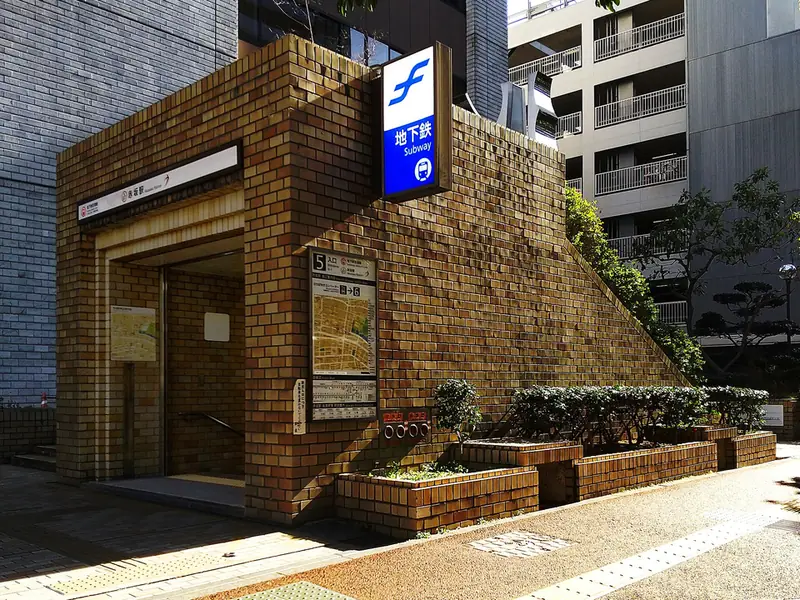
An access block whose train / bus / car tabs swap the starting point, travel time, map route and step photos as one set. Numbers on the inline-SVG map and on the real photos point to the same places — station exit, the corner to turn at, and the building entrance. Picking a number syncs the map and the large photo; on phones the selected photo sits right under the map. No map API. Photos are real street shots taken in Fukuoka (Wikimedia Commons, CC BY-SA 4.0 and CC BY 4.0).
Preview
Access & Directions
住所ではなく、見える景色で案内します。
起点けやき通り駅 5番出口
徒歩6分目印 4か所
地図の番号と写真の番号は同じ場所です。番号を押すと、その場所の写真に切り替わります。
 1STEP 1 / 4
1/4:5番出口から地上へ
れんが張りの出入口に、青い「地下鉄」の看板。地上に出たら、植え込みを右手に見て歩道へ進みます。
5番以外の出口からは三丁目通りを渡ることになり、信号待ちの分だけ遅くなります。
- 所在地
- ○○市中央区けやき通り3-0-0 けやきテラス 5F
- 受付時間
- 平日 10:00–19:00(土曜は前日までのご予約制)
- お電話
- 000-0000-0000
地図は画像なので、同じ道順を番号つきの文字でも並べています(W3C「WCAG 2.2」達成基準 1.1.1)。地図の番号は 28px で、達成基準 2.5.8 の 24px 以上です。手段の切替の動きは、OS の「視差効果を減らす」設定で止まります(達成基準 2.3.3)。2024年12月12日勧告版を2026年11月5日に確認。
写真の出典(Wikimedia Commons・8枚)
写真はすべて福岡市内で撮影されたものを、4:3 に切り抜いて縮小しました(入口の写真はビル名をぼかしています)。地図上の駅名・社名・住所は架空の見本です。2026年11月5日に各ファイルのページでライセンスを確認。
- れんが張りの地下鉄の出入口 — Hirho / CC BY-SA 4.0
- 大きなけやきが歩道沿いに並ぶ片側2車線の通り — Hirho / CC BY-SA 4.0
- 信号機と青い案内標識が立つ交差点 — Hirho / CC BY-SA 4.0
- 交差点の角に建つ黒い壁の建物 — Hirho / CC BY-SA 4.0
- 屋根付きのバス停 — Hirho / CC BY 4.0
- 高速道路の高架の下を通る一般道 — Hirho / CC BY-SA 4.0
- 地下駐車場の入庫口 — Hirho / CC BY-SA 4.0
- ガラスの自動ドアの入口 — Hirho / CC BY-SA 4.0


Read the full description
An access block whose train / bus / car tabs swap the starting point, travel time, map route and step photos as one set. Numbers on the inline-SVG map and on the real photos point to the same places — station exit, the corner to turn at, and the building entrance. Picking a number syncs the map and the large photo; on phones the selected photo sits right under the map. No map API. Photos are real street shots taken in Fukuoka (Wikimedia Commons, CC BY-SA 4.0 and CC BY 4.0).
- Added:
- 2026-08-11
- Updated:
- 2026-11-06
- Dependencies:
- None
- tags
- #access #map #svg #directions #tabs #landmark #photo #route #company #section #block #a11y #motion #wayfinding
"use client";
import { useEffect, useRef, useState } from "react";
import type { KeyboardEvent } from "react";
import { Montserrat } from "next/font/google";
const montserrat = Montserrat({
weight: ["600", "700"],
subsets: ["latin"],
display: "swap",
});
/**
* SVGアクセスマップ(交通手段タブ+写真付き道順)
* 既存 BLK-11 company-access(定義リスト型=会社を知る)の対で、こちらは「行き方が分かる」ことに絞った経路特化。
*
* 汎用技法メモ:
* - 地図は外部APIを使わず inline SVG で完結させる(viewBox 480x340・街区/道路/線路/経路/地名)。
* 道路は「太いグレーの線の上に細い白の線を重ねる」と2本描くだけで縁取り道路になる。
* 地名は <text> に paint-order: stroke と白い縁取りを付けると、道路や街区の上でも読める。
* - 地図の番号と写真の番号を同じ state(selectedNo)から描く。地図の番号・写真の帯・前へ/次へのどれを押しても
* 同じ値が変わるので、対応がずれない。最後の番号は必ず「入口」(到着地点)にする。
* - 番号ピンは SVG ではなく地図の上に重ねた HTML のボタンにする(left/top を viewBox 座標の % で置く)。
* 地図が縮んでもピンは 28px のまま(WCAG 2.2 の 24px 以上)で押しやすい。
* - スマートフォンでは「地図 → 選択中の写真 → 写真の帯」の順に縦に積み、地図の直下で照合できるようにする。
* - 手段タブの切替は 260ms。経路は pathLength="1" + stroke-dashoffset 1→0 で描き直し、
* 起点・所要時間・地図・写真をひとまとまりで入れ替える。prefers-reduced-motion では即時に切り替える。
* - 経路の「流れ」は点の opacity を負の animation-delay でずらすだけで作れる(stroke-dashoffset を常時動かさない)。
* - 写真は Wikimedia Commons の CC BY-SA 4.0 / CC BY 4.0 の実写を、1つの街(福岡市)でそろえて使っている。
* 差し替えるときは photos の src・alt・credit だけを書き換える。地図上の駅名・社名・住所は架空の見本。
*/
type PhotoKey = "exit" | "street" | "cross" | "corner" | "bus" | "hwy" | "park" | "office";
type Photo = {
src: string;
alt: string;
credit: { author: string; license: string; licenseUrl: string; fileUrl: string };
};
const BY_SA = { license: "CC BY-SA 4.0", licenseUrl: "https://creativecommons.org/licenses/by-sa/4.0/deed.ja" };
const BY = { license: "CC BY 4.0", licenseUrl: "https://creativecommons.org/licenses/by/4.0/deed.ja" };
const COMMONS = "https://commons.wikimedia.org/wiki/File:";
/** 実写(800x600・webp)。撮影はすべて福岡市内 */
const photos: Record<PhotoKey, Photo> = {
exit: {
src: "/designs/company-access-map-exit.webp",
alt: "れんが張りの地下鉄の出入口。壁に青い「地下鉄」の看板と、出口番号5の案内板がある",
credit: { author: "Hirho", ...BY_SA, fileUrl: `${COMMONS}Akasaka_Station_the_5th_Exit_Daimy%C5%8D_2-ch%C5%8Dme_Ch%C5%AB%C5%8D-ku_Fukuoka_20250407.jpg` },
},
street: {
src: "/designs/company-access-map-street.webp",
alt: "大きなけやきが歩道沿いに並ぶ片側2車線の通り",
credit: { author: "Hirho", ...BY_SA, fileUrl: `${COMMONS}Keyaki_D%C5%8Dri_the_street_near_Akasaka_3-ch%C5%8Dme_INT_Ch%C5%AB%C5%8D-ku_Fukuoka_20250527_163917.jpg` },
},
cross: {
src: "/designs/company-access-map-cross.webp",
alt: "信号機と青い案内標識が立つ交差点。横断歩道を自転車が渡っている",
credit: { author: "Hirho", ...BY_SA, fileUrl: `${COMMONS}Keyaki_D%C5%8Dri_the_ENE_view_from_Akasaka_3-ch%C5%8Dme_INT_Ch%C5%AB%C5%8D-ku_Fukuoka_20250519_162748.jpg` },
},
corner: {
src: "/designs/company-access-map-corner.webp",
alt: "交差点の角に建つ黒い壁の建物。壁の上部に猫の顔が描かれている",
credit: { author: "Hirho", ...BY_SA, fileUrl: `${COMMONS}Keyaki_D%C5%8Dri_the_ENE_view_from_Akasaka_839th_Street_Ch%C5%AB%C5%8D-ku_Fukuoka_20250519_164901.jpg` },
},
bus: {
src: "/designs/company-access-map-bus.webp",
alt: "屋根付きのバス停。ベンチと時刻表の柱があり、道路の向こうに緑の木々が見える",
credit: { author: "Hirho", ...BY, fileUrl: `${COMMONS}Sh%C5%8Dwa_D%C5%8Dri_The_Arato_1-ch%C5%8Dme_bus_stop_%C5%8Ctemon_3-ch%C5%8Dme_Ch%C5%AB%C5%8D-ku_Fukuoka_20260611.jpg` },
},
hwy: {
src: "/designs/company-access-map-hwy.webp",
alt: "高速道路の高架の下を通る一般道。右奥へゆるく曲がっている",
credit: { author: "Hirho", ...BY_SA, fileUrl: `${COMMONS}Meinohama_Exit_Ramp_Fukuoka_Urban_Expressway_Meinohama-Eki-Minami-2-ch%C5%8Dme_Nishi-ku_Fukuoka_City_20220826.jpg` },
},
park: {
src: "/designs/company-access-map-park.webp",
alt: "地下駐車場の入庫口。青い「入庫口」の表示と、大きなPの看板が立っている",
credit: { author: "Hirho", ...BY_SA, fileUrl: `${COMMONS}Fukuoka_Ch%C5%AB%C5%8D_Parking_Lot_the_entrance_Tenjin_2-ch%C5%8Dme_Ch%C5%AB%C5%8D-ku_Fukuoka_20241014.jpg` },
},
office: {
src: "/designs/company-access-map-office.webp",
alt: "ガラスの自動ドアの入口。右手の壁一面が植栽で覆われ、床に点字ブロックが入口まで続く",
credit: { author: "Hirho", ...BY_SA, fileUrl: `${COMMONS}Fukuoka_Daimy%C5%8D_Garden_City_Tower_the_office_entrance_Daimy%C5%8D_2-ch%C5%8Dme_Ch%C5%AB%C5%8D-ku_Fukuoka_20240812.jpg` },
},
};
type Spot = {
/** 地図と写真で共通の通し番号。最後は到着地点(入口) */
no: number;
title: string;
/** 写真に写っている物で「ここで合っている」と分かる説明 */
note: string;
photo: PhotoKey;
/** 地図座標(viewBox 480x340) */
x: number;
y: number;
};
type Route = {
id: string;
label: string;
en: string;
from: string;
minutes: string;
means: string;
/** 地図に描く経路(乗り物・徒歩の本線) */
path: readonly (readonly [number, number])[];
/** 車を停めてから入口までの徒歩(破線で描く) */
walk?: readonly (readonly [number, number])[];
spots: Spot[];
caution: string;
};
/** 到着地点(ビルの正面入口) */
const GOAL = { x: 268, y: 194 };
const routes: Route[] = [
{
id: "train",
label: "電車で",
en: "By train",
from: "けやき通り駅 5番出口",
minutes: "6",
means: "徒歩",
path: [
[150, 84],
[150, 176],
[268, 176],
[GOAL.x, GOAL.y],
],
spots: [
{
no: 1,
title: "5番出口から地上へ",
note: "れんが張りの出入口に、青い「地下鉄」の看板。地上に出たら、植え込みを右手に見て歩道へ進みます。",
photo: "exit",
x: 150,
y: 84,
},
{
no: 2,
title: "けやき並木を南へ",
note: "歩道沿いに大きなけやきが並ぶ通りです。並木の歩道を、信号のある交差点まで直進します。",
photo: "street",
x: 150,
y: 128,
},
{
no: 3,
title: "三丁目交差点を左へ",
note: "信号機と青い案内標識が立つ交差点。横断歩道は渡らず、手前の角を左に曲がります。",
photo: "cross",
x: 150,
y: 176,
},
{
no: 4,
title: "緑の壁の入口に到着",
note: "右手に壁一面の植栽、正面がガラスの自動ドア。点字ブロックに沿って入り、エレベーターで5Fの受付へ。",
photo: "office",
x: GOAL.x,
y: GOAL.y,
},
],
caution: "5番以外の出口からは三丁目通りを渡ることになり、信号待ちの分だけ遅くなります。",
},
{
id: "bus",
label: "バスで",
en: "By bus",
from: "三丁目東 バス停",
minutes: "3",
means: "徒歩",
path: [
[432, 176],
[268, 176],
[GOAL.x, GOAL.y],
],
spots: [
{
no: 1,
title: "三丁目東で降りる",
note: "屋根とベンチのある停留所です。降りたら、バスが来た方向(西)へ歩道を戻ります。",
photo: "bus",
x: 432,
y: 176,
},
{
no: 2,
title: "黒い建物の角を過ぎる",
note: "壁に猫の顔が描かれた黒い建物が角の目印。脇道は曲がらず、そのまま直進します。",
photo: "corner",
x: 330,
y: 176,
},
{
no: 3,
title: "緑の壁の入口に到着",
note: "左手に見えるガラスの入口です。壁一面の植栽が目印。受付は5Fです。",
photo: "office",
x: GOAL.x,
y: GOAL.y,
},
],
caution: "1時間に3〜4本の運行です。帰りの時刻表は受付でもお渡しできます。",
},
{
id: "car",
label: "お車で",
en: "By car",
from: "都市高速 けやき出口",
minutes: "5",
means: "走行",
path: [
[22, 300],
[268, 300],
[268, 276],
],
walk: [
[282, 262],
[312, 262],
[312, 186],
[GOAL.x + 8, 186],
],
spots: [
{
no: 1,
title: "けやき出口から高架下へ",
note: "出口を降りると高架の下の道に合流します。高架に沿って東へ直進します。",
photo: "hwy",
x: 46,
y: 300,
},
{
no: 2,
title: "青いPの入庫口へ",
note: "大きなPの看板と青い「入庫口」の表示が目印の地下駐車場です。提携の駐車券は受付で処理します。",
photo: "park",
x: 268,
y: 272,
},
{
no: 3,
title: "正面入口へ回る",
note: "駐車場の東側の通路を北へ。表通りに出て左手、緑の壁のガラスの入口から入ります。",
photo: "office",
x: GOAL.x,
y: GOAL.y,
},
],
caution: "入庫口に高さ制限があります。車高の高い車や満車のときは、受付へお電話ください。",
},
];
/** 地図上の地名(どの手段でも出す) */
const placeLabels: { x: number; y: number; text: string; anchor?: "start" | "middle" | "end" }[] = [
{ x: 132, y: 42, text: "けやき通り駅", anchor: "middle" },
{ x: 180, y: 90, text: "5番出口", anchor: "start" },
{ x: 124, y: 133, text: "けやき通り", anchor: "end" },
{ x: 130, y: 212, text: "三丁目交差点", anchor: "end" },
{ x: 474, y: 212, text: "三丁目東 バス停", anchor: "end" },
{ x: 342, y: 246, text: "黒い建物", anchor: "start" },
{ x: 22, y: 337, text: "都市高速 けやき出口", anchor: "start" },
{ x: 66, y: 168, text: "三丁目通り", anchor: "middle" },
];
/** 会社の要点だけ(詳細版は BLK-11 company-access 側)。住所・電話は見本 */
const summary: { term: string; value: string }[] = [
{ term: "所在地", value: "○○市中央区けやき通り3-0-0 けやきテラス 5F" },
{ term: "受付時間", value: "平日 10:00–19:00(土曜は前日までのご予約制)" },
{ term: "お電話", value: "000-0000-0000" },
];
/* ---------------------------------------------------------------- 地図 */
/**
* ポリライン上を等間隔でサンプリングして「流れる点」の座標を作る。
* acc に次の点までの残距離を持ち越すと、折れ点をまたいでも間隔が崩れない。
*/
function flowDots(points: readonly (readonly [number, number])[], step = 15) {
const dots: { x: number; y: number }[] = [];
let acc = 0;
for (let i = 0; i < points.length - 1; i += 1) {
const [x1, y1] = points[i];
const [x2, y2] = points[i + 1];
const len = Math.hypot(x2 - x1, y2 - y1);
if (len === 0) continue;
let d = acc;
while (d < len) {
const t = d / len;
dots.push({ x: x1 + (x2 - x1) * t, y: y1 + (y2 - y1) * t });
d += step;
}
acc = d - len;
}
return dots;
}
const pts = (p: readonly (readonly [number, number])[]) => p.map(([x, y]) => `${x},${y}`).join(" ");
/** 街区(単位は viewBox のユーザー座標) */
const cityBlocks = [
{ x: 18, y: 88, w: 116, h: 70 },
{ x: 168, y: 82, w: 104, h: 76 },
{ x: 290, y: 76, w: 172, h: 82 },
{ x: 18, y: 194, w: 116, h: 88 },
{ x: 168, y: 194, w: 56, h: 88 },
{ x: 348, y: 194, w: 114, h: 88 },
{ x: 18, y: 318, w: 444, h: 22 },
];
/** 道路(太いグレー → 細い白 の2度描き) */
const roads = [
{ x1: 0, y1: 176, x2: 480, y2: 176 },
{ x1: 150, y1: 76, x2: 150, y2: 340 },
{ x1: 330, y1: 176, x2: 330, y2: 300 },
{ x1: 0, y1: 300, x2: 480, y2: 300 },
];
/** けやき並木(けやき通りの両側に小さな円を並べる) */
const trees = Array.from({ length: 6 }, (_, i) => 92 + i * 14);
function AccessMap({
route,
litNo,
onPick,
onHover,
}: {
route: Route;
litNo: number;
onPick: (no: number) => void;
onHover: (no: number | null) => void;
}) {
const dots = flowDots(route.path);
const last = route.spots[route.spots.length - 1];
return (
<div className="relative aspect-[480/340] w-full overflow-hidden rounded-lg border border-gray-200 bg-[#faf9f7]">
<svg viewBox="0 0 480 340" className="h-full w-full" aria-hidden="true">
{cityBlocks.map((b, i) => (
<rect key={i} x={b.x} y={b.y} width={b.w} height={b.h} rx="3" className="fill-gray-200/70" />
))}
{/* 目的のビル(アンバーの縁)・駐車場・黒い建物 */}
<rect x="236" y="192" width="64" height="54" rx="3" className="fill-amber-50 stroke-amber-500" strokeWidth="1.5" />
<rect x="236" y="254" width="64" height="30" rx="3" className="fill-gray-200 stroke-gray-300" strokeWidth="1" />
<text x="268" y="275" textAnchor="middle" className={`${montserrat.className} fill-gray-500 text-[15px] font-bold`}>
P
</text>
<rect x="342" y="194" width="24" height="34" rx="2" className="fill-gray-600" />
<g className="stroke-gray-300" strokeWidth="26" strokeLinecap="square">
{roads.map((r, i) => (
<line key={i} {...r} />
))}
</g>
<g className="stroke-[#fdfcfb]" strokeWidth="20" strokeLinecap="square">
{roads.map((r, i) => (
<line key={i} {...r} />
))}
</g>
{/* けやき並木 */}
{trees.map((y) => (
<g key={y} className="fill-emerald-700/25">
<circle cx="136" cy={y + 4} r="4" />
<circle cx="164" cy={y + 4} r="4" />
</g>
))}
{/* 都市高速の高架(下の道路に沿う帯) */}
<line x1="0" y1="324" x2="480" y2="324" className="stroke-gray-400/60" strokeWidth="5" />
{/* 線路と駅 */}
<line x1="0" y1="62" x2="480" y2="62" className="stroke-[#c9c4bd]" strokeWidth="3" strokeDasharray="9 7" />
<rect x="100" y="52" width="64" height="20" rx="3" className="fill-white stroke-gray-400" strokeWidth="1.5" />
{/* 経路: 下地の帯 → 描き直す線 → 流れる点。key を変えると切替のたびに描き直す */}
<g key={route.id}>
<polyline
points={pts(route.path)}
fill="none"
className="stroke-amber-500/25"
strokeWidth="8"
strokeLinecap="round"
strokeLinejoin="round"
/>
<polyline
points={pts(route.path)}
pathLength={1}
fill="none"
className="stroke-amber-600 animate-[cam-draw_300ms_ease-out_both] motion-reduce:animate-none"
strokeWidth="2.5"
strokeDasharray="1"
strokeLinecap="round"
strokeLinejoin="round"
/>
{route.walk && (
<polyline
points={pts(route.walk)}
fill="none"
className="stroke-amber-600/80"
strokeWidth="2.5"
strokeDasharray="2 5"
strokeLinecap="round"
strokeLinejoin="round"
/>
)}
{dots.map((p, i) => (
<circle
key={i}
cx={p.x}
cy={p.y}
r="2.6"
className="fill-amber-600 opacity-40 animate-[cam-flow_2.2s_ease-in-out_infinite] motion-reduce:animate-none"
style={{ animationDelay: `${(-i * 0.12).toFixed(2)}s` }}
/>
))}
</g>
{/* 到着地点(呼吸するリング) */}
<circle
cx={GOAL.x}
cy={GOAL.y}
r="10"
className="fill-amber-500/40 animate-[cam-pulse_2.8s_ease-out_infinite] motion-reduce:animate-none"
style={{ transformBox: "fill-box", transformOrigin: "center" }}
/>
{/* 地名(白い縁取りで道路・街区の上でも読める) */}
<g
className="fill-gray-600 text-[14px] font-bold"
stroke="#faf9f7"
strokeWidth="4"
strokeLinejoin="round"
style={{ paintOrder: "stroke" }}
>
{placeLabels.map((l) => (
<text key={l.text} x={l.x} y={l.y} textAnchor={l.anchor ?? "start"}>
{l.text}
</text>
))}
<text x="268" y="226" textAnchor="middle" className="fill-amber-700 text-[14px]">
入口
</text>
</g>
</svg>
{/* 番号ピン(HTML のボタンを viewBox 座標の % で重ねる。写真の帯と同じ番号・同じ state) */}
{route.spots.map((s) => {
const on = litNo === s.no;
const isGoal = s.no === last.no;
return (
<button
key={`${route.id}-${s.no}`}
type="button"
tabIndex={-1}
aria-hidden="true"
onClick={() => onPick(s.no)}
onMouseEnter={() => onHover(s.no)}
onMouseLeave={() => onHover(null)}
style={{ left: `${(s.x / 480) * 100}%`, top: `${(s.y / 340) * 100}%` }}
className={`${montserrat.className} absolute flex size-7 -translate-x-1/2 -translate-y-1/2 items-center justify-center rounded-full border-2 text-[12px] font-bold shadow-[0_2px_6px_-2px_rgba(0,0,0,0.35)] transition-[transform,background-color,color,border-color] duration-200 ease-out motion-reduce:transition-none ${
on
? "z-10 scale-125 border-white bg-amber-600 text-white motion-reduce:scale-100"
: isGoal
? "border-amber-600 bg-white text-amber-700 hover:scale-110"
: "border-white bg-gray-700 text-white hover:scale-110"
}`}
>
{s.no}
</button>
);
})}
<span
className={`${montserrat.className} pointer-events-none absolute right-2.5 bottom-2 text-[9px] font-semibold tracking-[0.22em] text-gray-400 uppercase`}
>
Not to scale
</span>
</div>
);
}
/* ---------------------------------------------------------------- 本体 */
export default function CompanyAccessMap({ headingTag = "h2" }: { headingTag?: "h1" | "h2" | "p" }) {
const Heading = headingTag;
const rootRef = useRef<HTMLElement>(null);
const tabRefs = useRef<(HTMLButtonElement | null)[]>([]);
const [active, setActive] = useState(false);
const [routeIndex, setRouteIndex] = useState(0);
const [selectedNo, setSelectedNo] = useState(1);
const [hoverNo, setHoverNo] = useState<number | null>(null);
const route = routes[routeIndex];
const spot = route.spots.find((s) => s.no === selectedNo) ?? route.spots[0];
const photo = photos[spot.photo];
const litNo = hoverNo ?? spot.no;
const total = route.spots.length;
// 画面内に入ったらリビール開始(IO 非対応環境は即時表示)
useEffect(() => {
const el = rootRef.current;
if (!el) return;
if (typeof IntersectionObserver === "undefined") {
const id = requestAnimationFrame(() => setActive(true));
return () => cancelAnimationFrame(id);
}
const io = new IntersectionObserver(
(entries) => {
if (entries.some((e) => e.isIntersecting)) {
setActive(true);
io.disconnect();
}
},
{ threshold: 0.1 }
);
io.observe(el);
return () => io.disconnect();
}, []);
const reveal = `transition-[opacity,transform] duration-500 ease-out motion-reduce:transition-none ${
active
? "translate-y-0 opacity-100"
: "translate-y-4 opacity-0 motion-reduce:translate-y-0 motion-reduce:opacity-100"
}`;
const selectRoute = (i: number) => {
setRouteIndex(i);
setSelectedNo(1);
setHoverNo(null);
};
const onTabKeyDown = (e: KeyboardEvent<HTMLButtonElement>, i: number) => {
const lastIndex = routes.length - 1;
let next = -1;
if (e.key === "ArrowRight" || e.key === "ArrowDown") next = i === lastIndex ? 0 : i + 1;
else if (e.key === "ArrowLeft" || e.key === "ArrowUp") next = i === 0 ? lastIndex : i - 1;
else if (e.key === "Home") next = 0;
else if (e.key === "End") next = lastIndex;
if (next < 0) return;
e.preventDefault();
selectRoute(next);
tabRefs.current[next]?.focus();
};
const stepBtn =
"inline-flex h-11 min-w-11 items-center justify-center gap-1.5 rounded-md border border-gray-300 bg-white px-3 text-[13px] font-bold text-gray-800 transition-colors duration-150 hover:border-gray-900 disabled:cursor-not-allowed disabled:border-gray-200 disabled:text-gray-300 focus-visible:outline-2 focus-visible:outline-offset-2 focus-visible:outline-amber-600 motion-reduce:transition-none";
return (
<section
ref={rootRef}
aria-labelledby="company-access-map-heading"
className="w-full max-w-5xl bg-white px-2 sm:px-0"
>
{/* ヘッダー(短く。地図と写真を早く見せる) */}
<header className={reveal}>
<div className="min-w-0">
<p
className={`${montserrat.className} text-[11px] font-bold tracking-[0.25em] text-amber-600 uppercase`}
>
Access & Directions
</p>
<Heading
id="company-access-map-heading"
className="mt-1.5 text-[clamp(1.3rem,2.8vw,1.75rem)] leading-[1.35] font-bold tracking-tight text-gray-900"
>
住所ではなく、
<span className="relative whitespace-nowrap">
見える景色
<span aria-hidden="true" className="absolute -bottom-0.5 left-0 h-[3px] w-full bg-amber-500/70" />
</span>
<span className="whitespace-nowrap">で案内します。</span>
</Heading>
</div>
</header>
{/* 手段タブ(ARIA tabs・矢印キー対応) */}
<div className={`mt-3 border-b border-gray-200 ${reveal}`} style={{ transitionDelay: "60ms" }}>
<div role="tablist" aria-label="来社手段" className="-mb-px flex flex-nowrap items-stretch gap-x-1 overflow-x-auto">
{routes.map((r, i) => {
const on = i === routeIndex;
return (
<button
key={r.id}
ref={(el) => {
tabRefs.current[i] = el;
}}
type="button"
role="tab"
id={`cam-tab-${r.id}`}
aria-selected={on}
aria-controls={`cam-panel-${r.id}`}
tabIndex={on ? 0 : -1}
onClick={() => selectRoute(i)}
onKeyDown={(e) => onTabKeyDown(e, i)}
className={`relative flex-none px-3 py-3 text-[14px] font-bold whitespace-nowrap tracking-[0.06em] transition-colors duration-150 focus-visible:outline-2 focus-visible:outline-offset-2 focus-visible:outline-amber-600 motion-reduce:transition-none sm:px-5 ${
on ? "text-amber-700" : "text-gray-400 hover:text-gray-700"
}`}
>
<span className="flex items-baseline gap-2">
{r.label}
{/* 英字は 375px で3タブが折り返す原因になるため sm 未満では出さない */}
<span
className={`${montserrat.className} hidden text-[10px] font-semibold tracking-[0.14em] uppercase sm:inline ${
on ? "text-amber-600" : "text-gray-300"
}`}
>
{r.en}
</span>
</span>
<span
aria-hidden="true"
className={`absolute bottom-0 left-0 h-[3px] w-full origin-left bg-amber-600 transition-transform duration-200 ease-out motion-reduce:transition-none ${
on ? "scale-x-100" : "scale-x-0"
}`}
/>
</button>
);
})}
</div>
</div>
{/* 経路パネル(起点・所要時間・地図・写真をひとまとまりで切り替える) */}
<div
role="tabpanel"
id={`cam-panel-${route.id}`}
aria-labelledby={`cam-tab-${route.id}`}
tabIndex={-1}
className={`pt-4 focus-visible:outline-2 focus-visible:outline-offset-4 focus-visible:outline-amber-600 ${reveal}`}
style={{ transitionDelay: "120ms" }}
>
<div key={route.id} className="animate-[cam-in_260ms_ease-out] motion-reduce:animate-none">
{/* 起点・所要時間 */}
<div className="flex flex-wrap items-end justify-between gap-x-6 gap-y-1">
<p className="text-[13px] leading-[1.7] text-gray-600">
<span className="mr-2 text-[11px] font-bold tracking-[0.12em] text-gray-500">起点</span>
<span className="font-bold text-gray-900">{route.from}</span>
</p>
<p className="flex items-baseline gap-1.5 text-gray-900">
<span className="text-[11px] font-bold tracking-[0.12em] text-gray-500">{route.means}</span>
<span className={`${montserrat.className} text-[1.9rem] leading-none font-bold tracking-tight text-amber-600`}>
{route.minutes}
</span>
<span className="text-sm font-bold">分</span>
<span className="ml-2 text-[11px] font-bold text-gray-500">目印 {total}か所</span>
</p>
</div>
{/* 地図(左)と選択中の写真(右・スマートフォンは地図の直下) */}
<div className="mt-3 grid grid-cols-1 gap-4 lg:grid-cols-12 lg:gap-6">
<div className="lg:col-span-7">
<AccessMap route={route} litNo={litNo} onPick={setSelectedNo} onHover={setHoverNo} />
<p className="mt-2 text-[12px] leading-[1.8] text-gray-500">
地図の番号と写真の番号は同じ場所です。番号を押すと、その場所の写真に切り替わります。
</p>
</div>
<figure className="lg:col-span-5">
<div className="relative aspect-[4/3] w-full overflow-hidden rounded-lg bg-gray-100">
{/* eslint-disable-next-line @next/next/no-img-element -- 静的書き出しのため最適化なしの img を使う */}
<img
key={`${route.id}-${spot.no}`}
src={photo.src}
alt={photo.alt}
width={800}
height={600}
decoding="async"
className="absolute inset-0 h-full w-full animate-[cam-photo_260ms_ease-out] object-cover motion-reduce:animate-none"
/>
<span
className={`${montserrat.className} absolute top-2.5 left-2.5 flex items-center gap-1.5 rounded-full bg-gray-900/80 py-1 pr-3 pl-1 text-[11px] font-bold text-white`}
>
<span className="flex size-6 items-center justify-center rounded-full bg-amber-600 text-[12px]">
{spot.no}
</span>
{spot.no === total ? "GOAL" : `STEP ${spot.no} / ${total}`}
</span>
</div>
<figcaption className="mt-3" aria-live="polite">
<p className="text-[15px] leading-[1.5] font-bold text-gray-900">
<span className="sr-only">
{spot.no}/{total}:
</span>
{spot.title}
</p>
<p className="mt-1 text-[13px] leading-[1.85] text-gray-600">{spot.note}</p>
</figcaption>
<div className="mt-3 flex items-center gap-2">
<button
type="button"
className={stepBtn}
disabled={spot.no === 1}
onClick={() => setSelectedNo(spot.no - 1)}
>
<span aria-hidden="true">←</span>前へ
</button>
<button
type="button"
className={stepBtn}
disabled={spot.no === total}
onClick={() => setSelectedNo(spot.no + 1)}
>
次へ<span aria-hidden="true">→</span>
</button>
</div>
</figure>
</div>
{/* 写真の帯(番号=地図の番号。押すと地図と大きな写真が切り替わる) */}
<ol
aria-label={`${route.label}の道順`}
className="mt-5 grid gap-2 sm:gap-3"
style={{ gridTemplateColumns: `repeat(${total}, minmax(0, 1fr))` }}
>
{route.spots.map((s) => {
const on = spot.no === s.no;
const lit = litNo === s.no;
return (
<li key={s.no} className="min-w-0">
<button
type="button"
aria-current={on ? "step" : undefined}
onClick={() => setSelectedNo(s.no)}
onMouseEnter={() => setHoverNo(s.no)}
onMouseLeave={() => setHoverNo(null)}
onFocus={() => setHoverNo(s.no)}
onBlur={() => setHoverNo(null)}
className="group block w-full text-left focus-visible:outline-2 focus-visible:outline-offset-2 focus-visible:outline-amber-600"
>
<span
className={`relative block aspect-[4/3] overflow-hidden rounded-md ring-offset-2 transition-shadow duration-200 motion-reduce:transition-none ${
on ? "ring-2 ring-amber-600" : lit ? "ring-2 ring-gray-400" : "ring-0"
}`}
>
{/* eslint-disable-next-line @next/next/no-img-element -- 静的書き出しのため最適化なしの img を使う */}
<img
src={photos[s.photo].src}
alt=""
width={800}
height={600}
decoding="async"
className={`h-full w-full object-cover transition-[filter,transform] duration-200 group-hover:scale-[1.03] motion-reduce:transition-none motion-reduce:group-hover:scale-100 ${
on ? "" : "brightness-90 saturate-[0.85]"
}`}
/>
<span
className={`${montserrat.className} absolute top-1 left-1 flex size-5 items-center justify-center rounded-full text-[11px] font-bold ${
on ? "bg-amber-600 text-white" : "bg-white/95 text-gray-700"
}`}
>
{s.no}
</span>
</span>
<span
className={`mt-1.5 block text-[11px] leading-[1.45] font-bold sm:text-[12px] ${
on ? "text-amber-700" : "text-gray-600"
}`}
>
{s.title}
</span>
</button>
</li>
);
})}
</ol>
<p className="mt-4 flex items-start gap-2.5 text-[12px] leading-[1.9] text-gray-500">
<span aria-hidden="true" className="mt-[0.85em] h-px w-3 flex-none bg-amber-600" />
<span>{route.caution}</span>
</p>
</div>
</div>
{/* 住所・受付(地図が読めない場合の逃げ道は必ずテキストで) */}
<div className={`mt-6 border-t border-b border-gray-200 py-5 ${reveal}`} style={{ transitionDelay: "180ms" }}>
<div className="flex flex-col gap-4 sm:flex-row sm:items-end sm:justify-between">
<dl className="divide-y divide-gray-100">
{summary.map((row) => (
<div key={row.term} className="grid grid-cols-[4.5rem_1fr] gap-x-3 py-2 sm:grid-cols-[5.5rem_1fr]">
<dt className="pt-[0.3em] text-[11px] font-bold tracking-[0.12em] whitespace-nowrap text-gray-500">
{row.term}
</dt>
<dd className="text-[13px] leading-[1.85] font-medium text-gray-900 sm:text-sm">{row.value}</dd>
</div>
))}
</dl>
<a
href="#"
className="group inline-flex min-h-11 flex-none items-center gap-2 text-[13px] font-semibold text-gray-900 focus-visible:outline-2 focus-visible:outline-offset-4 focus-visible:outline-amber-600"
>
<span className="relative">
地図アプリで開く
<span className="absolute -bottom-1 left-0 h-px w-full origin-left scale-x-100 bg-gray-900 transition-transform duration-300 ease-out group-hover:scale-x-0 motion-reduce:transition-none" />
<span className="absolute -bottom-1 left-0 h-px w-full origin-right scale-x-0 bg-amber-600 transition-transform delay-150 duration-300 ease-out group-hover:origin-left group-hover:scale-x-100 motion-reduce:transition-none" />
</span>
<span
aria-hidden="true"
className="inline-block transition-transform duration-300 ease-out group-hover:translate-x-1 motion-reduce:transition-none"
>
→
</span>
</a>
</div>
</div>
{/* 出典(写真の権利表記と、作りの根拠) */}
<div className="mt-4 space-y-2 text-[11px] leading-[1.8] text-gray-500">
<p>
地図は画像なので、同じ道順を番号つきの文字でも並べています(W3C「
<a
href="https://www.w3.org/TR/WCAG22/#non-text-content"
className="underline decoration-gray-300 underline-offset-2 hover:text-gray-700"
>
WCAG 2.2
</a>
」達成基準 1.1.1)。地図の番号は 28px で、達成基準 2.5.8 の 24px 以上です。手段の切替の動きは、OS の「視差効果を減らす」設定で止まります(達成基準 2.3.3)。2024年12月12日勧告版を2026年11月5日に確認。
</p>
<details className="group">
<summary className="inline-flex min-h-8 cursor-pointer items-center font-bold text-gray-600 hover:text-gray-900 focus-visible:outline-2 focus-visible:outline-offset-2 focus-visible:outline-amber-600">
写真の出典(Wikimedia Commons・8枚)
</summary>
<p className="mt-1">
写真はすべて福岡市内で撮影されたものを、4:3 に切り抜いて縮小しました(入口の写真はビル名をぼかしています)。地図上の駅名・社名・住所は架空の見本です。2026年11月5日に各ファイルのページでライセンスを確認。
</p>
<ul className="mt-1 grid gap-x-6 sm:grid-cols-2">
{(Object.keys(photos) as PhotoKey[]).map((k) => {
const c = photos[k].credit;
return (
<li key={k}>
<a href={c.fileUrl} className="underline decoration-gray-300 underline-offset-2 hover:text-gray-700">
{photos[k].alt.split("。")[0]}
</a>{" "}
— {c.author} /{" "}
<a href={c.licenseUrl} className="underline decoration-gray-300 underline-offset-2 hover:text-gray-700">
{c.license}
</a>
</li>
);
})}
</ul>
</details>
</div>
{/* このブロック内で完結するキーフレーム(transform / opacity / dashoffset のみ) */}
<style>{`
@keyframes cam-flow {
0%, 100% { opacity: 0.18; }
45% { opacity: 0.95; }
}
@keyframes cam-pulse {
0% { transform: scale(1); opacity: 0.5; }
70% { transform: scale(2.6); opacity: 0; }
100% { transform: scale(2.6); opacity: 0; }
}
@keyframes cam-in {
from { transform: translateY(8px); opacity: 0; }
to { transform: translateY(0); opacity: 1; }
}
@keyframes cam-photo {
from { transform: scale(1.04); opacity: 0.2; }
to { transform: scale(1); opacity: 1; }
}
@keyframes cam-draw {
from { stroke-dashoffset: 1; }
to { stroke-dashoffset: 0; }
}
`}</style>
</section>
);
}
Add to your project via shadcn CLI
npx shadcn@latest add https://designs.first-ch.com/r/company-access-map.json